
Enhance Productivity with AI-Powered Browser Tools
The ChatGPT browser extension by Scailability.com is designed to streamline access to AI tools, particularly ChatGPT, directly within the browsing environment. It aims to improve workflow efficiency by integrating AI assistance into everyday web tasks. Users who rely on AI for content creation, research, or rapid information processing can benefit from having AI tools more readily available. The extension is tailored for professionals, students, and digital creators who frequently use search engines and require instant access to AI-driven insights.
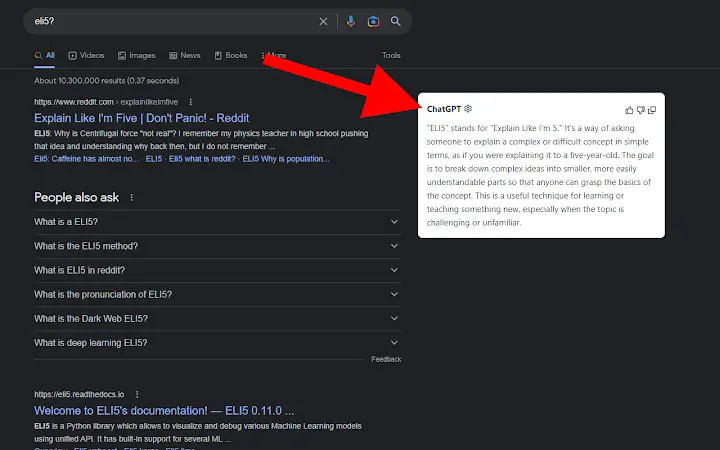
By displaying ChatGPT results side-by-side with standard search engine results on platforms like Google and Bing, the extension reduces context switching and enhances decision-making speed. Additionally, a right-click context menu provides quick access to a categorized list of popular AI tools, enabling users to select and launch relevant utilities without navigating away from their current page. This functionality supports real-world scenarios such as drafting emails, summarizing articles, or generating ideas during research sessions.
Key Features & Capabilities
- Side-by-side AI Results Display – The extension overlays ChatGPT responses next to traditional search results, allowing users to compare and evaluate AI-generated content alongside standard web results. This feature is useful when verifying information or seeking alternative perspectives on a topic.
- Context Menu Integration – A right-click menu on any webpage offers a categorized list of popular AI tools. This enables one-click access to various utilities, reducing the need to open new tabs or switch applications.
- Seamless Browser Integration – Designed to work directly within the user’s existing browser environment, the extension avoids disruptions to established workflows. It operates without requiring additional setup beyond installation.
- Multi-Platform Support – Compatible with both Windows and Mac operating systems, ensuring accessibility across common desktop environments.
These features are intended to reduce time spent switching between tools and improve focus during research or content creation. For example, a student writing a paper can right-click a paragraph to instantly access AI summarization tools, while a marketer can compare AI-generated ad copy with organic search results in real time.
User Interface, Workflow & Performance
The user interface of the extension is minimal and unobtrusive, designed to blend into the browser’s native layout. It does not alter the appearance of search results significantly, preserving readability while adding AI-generated content in a clearly labeled section. Navigation is intuitive, relying on standard browser interactions such as right-clicking and scrolling.
Workflow efficiency is enhanced by reducing the number of steps required to access AI tools. Users can initiate AI tasks directly from any webpage without leaving the current context. The extension operates in the background, with no visible performance indicators or resource usage prompts.
The developer did not specify resource usage details. Performance observations are based on general software behavior patterns. Stability appears consistent with typical browser extensions, though no long-term usage data was provided.
Compatibility & System Requirements
The extension is compatible with Windows and Mac operating systems. It is available in version 1.0.0 and has an installation size of 1.2 MB, indicating a lightweight footprint. The developer did not provide additional system requirements.
Exact system requirements were not listed. Compatibility information was partially provided. Users should ensure their browser supports extensions from external sources, as this may affect installation and functionality.
Pros and Cons
Pros
- Lightweight installation at just 1.2 MB
- Direct integration with major search engines (Google, Bing)
- Quick access to AI tools via right-click context menu
- Free to use with no hidden costs
- Designed for productivity-focused workflows
Cons
- Exact performance impact on CPU and RAM not disclosed
- Limited to browser-based functionality
- Does not include offline access to AI tools
- No information on update frequency or release schedule
- Dependent on third-party AI services for functionality
FAQ Section
Is the extension compatible with all web browsers?
The extension is designed for use on Windows and Mac, but specific browser compatibility was not specified. Users should verify support with their browser’s extension marketplace.
Is the extension safe to use?
As with any browser extension, users should review permissions before installation. The developer, Scailability.com, is responsible for security practices, but no third-party audits were mentioned.
Does the extension require an internet connection?
Yes, the extension relies on external AI services to generate responses. It cannot function offline and requires a stable internet connection.
How often is the extension updated?
Update frequency was not disclosed by the developer. Users are advised to check the extension’s listing for the latest version.
Can I use the extension without a ChatGPT account?
The extension requires access to AI tools like ChatGPT. Users must have an active account with the respective service to utilize its full functionality.
Final Thoughts + CTA
The ChatGPT browser extension by Scailability.com delivers a focused and practical solution for users seeking to integrate AI assistance into their daily browsing. Its lightweight design, intuitive interface, and seamless integration with search engines make it a valuable tool for enhancing productivity. While it does not offer advanced customization or offline access, its core functionality is well-executed and purpose-built.
Professionals, students, and content creators who rely on AI tools will find this extension particularly useful. It minimizes workflow interruptions and promotes faster decision-making by bringing AI insights directly into the search experience.
Download ChatGPT browser extension now







